Common restaurant payroll mistakes: five checks before payday
Check hours, shift premiums, absences and pay changes before running restaurant payroll. A practical checklist for restaurants and cafés.
The timesheet has been approved. Yet hours are missing from the payslip.
This can happen when hours are approved after the payroll data was prepared. The timesheet may now be correct while the pay calculation still uses an earlier version.
Run these five checks before paying your restaurant team.
1. Check which changes made it into payroll
Review timesheets approved or corrected after the payroll data was prepared. Are those changes included in the current pay run?
Do the same for shifts added later or breaks that were corrected. If something is missing, find out why and decide how to handle it. Check that the correction actually makes it into the right pay run.
Read more about how to check timesheets before payroll.
2. Trace a late shift through to the payslip
Pick a shift that crosses midnight, such as 18:00–01:30. Follow the hours from the timesheet to the payroll records. Check the dates, the break and which hours were used to calculate any applicable unsocial-hours premium, known as OB in Sweden.
Then compare the records with the payslip. Hourly pay and OB can appear on separate lines. If the OB line shows a total for the whole period, use the payroll records to see which hours from that particular shift were included.
If someone stayed longer or went home earlier than planned, check how the time should be handled under their employment terms. The difference from the rota alone does not determine what they should be paid.
Read more about how to calculate OB pay for restaurant staff.
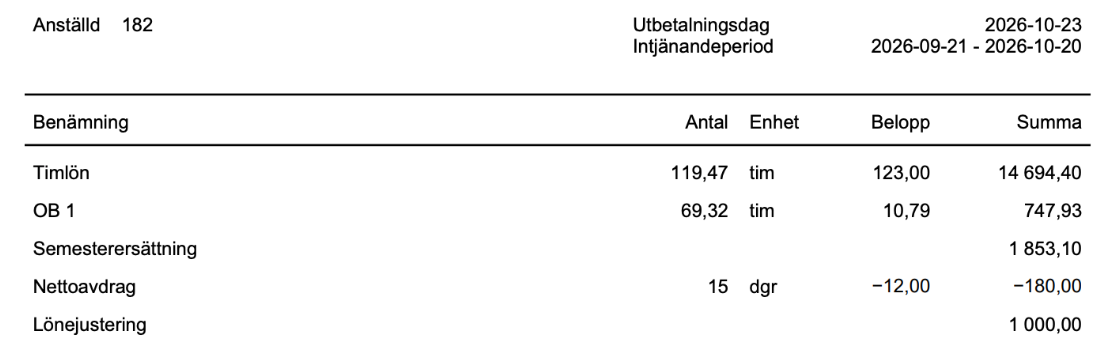
3. Reconcile absences with the payroll records
Check that the right person, dates, type of absence and amount of time are recorded. Pay particular attention to absences that cover only part of a shift.
If someone works lunch service and goes home sick before dinner service, the records need to distinguish hours worked from absence. A chat message can explain what happened. The information also needs to be recorded where pay is calculated.
4. Review what changed since the last pay run
Has someone received a new hourly rate, changed their contracted hours or started receiving an allowance? Check the effective date and the first pay run it affects.
If the hourly rate changed partway through the period, pick one shift before the change and one after it. Check the rate used for each. If holiday terms changed, check when they took effect and how the change appears in the payroll records.
5. Explain large differences before paying staff
Compare hours and gross pay with the previous period. Start with people who have unexpectedly few hours, a large change in pay or a correction from the last pay run.
Extra weekend shifts, a pay change or an absence may explain the difference. Also check that a correction already paid is not included a second time.
Try the checklist on a payslip that prompted a question
Pick an employee who had a question about their last pay. Trace their timesheet, absence records and employment terms through to the payslip. If you have to search old messages to explain a line, you know which step needs to be clearer.
In Simflexity, approved hours can feed into payroll. Before paying staff, the person responsible for payroll still needs to check which records were included and follow up on any changes.
Contact Simflexity or book a demo to see how this could work for your restaurant.